Pues eso… que en las aplicaciones para la Tienda de Windows te "exigen" que tengas una imagen de al menos 620×300 para usar como pantalla de presentación (splash screen) mientras la aplicación se carga.
Si quieres poner algún texto en esa imagen, dicho texto debe ser estático, es decir, cada vez que lo cambies en realidad estarías cambiando la imagen, y lo que te voy a explicar aquí es cómo añadir textos (o cualquier otra cosa) a esa imagen de inicio, pero de forma que sólo se añada (o sea visible) mientras está cargando el programa.
En este ejemplo he procurado que, en modo de diseño, la imagen esté centrada y dentro de un Grid con idea de que podamos situar los textos donde queramos que estén.
Hay que tener en cuenta que aquí estoy usando la imagen predeterminada de 620×300 pero si utilizas alguna de las otras dos, debes tenerlo en cuenta a la hora de posicionar los textos.
He dejado la imagen predeterminada, es decir, la que utiliza el Visual Studio al crear un nuevo proyecto, por tanto, los valores de las columnas y filas del Grid puede que no sean los adecuados si tienes otra imagen.
Lo que si es conveniente saber es que el ancho y alto de esas columnas y filas deben coincidir con el tamaño de la imagen, ya que así tendremos una visión exacta de dónde estarán posicionados las cosas que le añadamos a esa imagen de inicio.
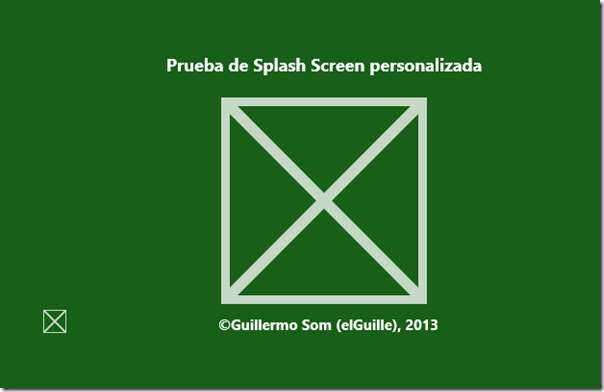
En este ejemplo he usado el logo pequeño de la aplicación (SmallLogo.png) y un par de cajas de textos, una de ellas la modifico (si es necesario) en tiempo de ejecución.
En la siguiente captura puedes ver cómo quedaría con el código de ejemplo usado en este artículo.
Nota:
El color de fondo de la pantalla de inicio y de la aplicación deberían coincidir con el indicado en el manifiesto de la aplicación (Package.appxmanifest), ya que si no… pues… lo mismo no queda bien.
Fíjate que en el manifiesto de la aplicación hay dos definiciones de colores, uno para las imágenes "normales" (los logos) y otro para la pantalla de inicio (Splash screen). Yo los he puesto todos (también el de MainPage) con el mismo color verde: #185F18.
Vamos a ver el código XAML de la página/control que hará de pantalla de inicio en este ejemplo.

El código Xaml
<Grid
    x:Class="Splash_Screen.ExtendedSplash"
    xmlns="http://schemas.microsoft.com/winfx/2006/xaml/presentation"
    xmlns:x="http://schemas.microsoft.com/winfx/2006/xaml"
    xmlns:d="http://schemas.microsoft.com/expression/blend/2008"
    xmlns:mc="http://schemas.openxmlformats.org/markup-compatibility/2006"
    xmlns:local="using:Splash_Screen"
    mc:Ignorable="d"
    Background="#185F18">

    <!-- la imagen tiene 620 x 300 -->
    <Canvas MaxHeight="300" MaxWidth="620">
        <Grid>
            <Grid.RowDefinitions>
                <RowDefinition Height="35" />
                <RowDefinition Height="225" />
                <RowDefinition Height="40" />
            </Grid.RowDefinitions>
            <Grid.ColumnDefinitions>
                <ColumnDefinition Width="60"/>
                <ColumnDefinition Width="140"/>
                <ColumnDefinition Width="420"/>
            </Grid.ColumnDefinitions>

            <Image x:Name="extendedSplashImage" Grid.Row="0" Grid.Column="0"
                   Grid.RowSpan="4" Grid.ColumnSpan="4"
                   Margin="0" Source="///Assets/SplashScreen.png"
                   ImageOpened="extendedSplashImage_ImageOpened"/>
            <TextBlock x:Name="txtTitulo" x:Uid="txtTitle"
                       Grid.Row="0" Grid.Column="0" Grid.ColumnSpan="3"
                       Foreground="White" FontSize="18" FontWeight="Bold"
                       HorizontalAlignment="Center"
                       Text="Prueba de Splash Screen personalizada" />
            <TextBlock x:Name="txtCopyr" Grid.Row="2" Grid.Column="2"
                       Foreground="White" FontSize="15" FontWeight="Bold"
                       Margin="0,10,0,0"
                       Text="©Guillermo Som (elGuille), 2013" />
            <Image Grid.Row="2" Grid.Column="0" Grid.RowSpan="2"
                   Height="30" Width="30" Stretch="Uniform"
                   Source="///Assets/SmallLogo.png" Margin="0,0,0,10"  Opacity="100" />
        </Grid>
    </Canvas>
</Grid>
Nota sobre las tres /// que hay delante de la carpeta en la que están las imágenes:
Esas tres barras indican que es desde el directorio base de la aplicación, de esa forma, si mueves este fichero de la Splash screen a otra carpeta no tendrás que hacer cambios para indicar la ruta de las imágenes.
Ahora veamos el código de esa página, como verás hay dos constructores, pero nosotros solo usaremos el que recibe dos parámetros.

El código para Visual Basic .NET
'------------------------------------------------------------------------------
' ExtendedSplash                                                    (19/Ene/13)
' Usar un SplashScreen personalizado
'
' Basado en un ejemplo de la MSDN (y creo que mejorado y simplificado)
' Sólo hay que modificar App.OnLaunched
'
' Cómo extender la pantalla de presentación
' http://msdn.microsoft.com/es-es/library/windows/apps/xaml/hh868191.aspx
' y Directrices y lista de comprobación para pantallas de presentación para
' Evitar un parpadeo durante la transición a la pantalla de presentación extendida
' http://msdn.microsoft.com/es-es/library/windows/apps/hh465338.aspx#ts_flicker_cs
'
'
' ©Guillermo 'guille' Som, 2013
'------------------------------------------------------------------------------

Imports System
Imports Windows.ApplicationModel.Activation
Imports Windows.Foundation
Imports Windows.UI.Core
Imports Windows.UI.Xaml
Imports Windows.UI.Xaml.Controls

Partial Class ExtendedSplash
    ' Rect to store splash screen image coordinates.
    Friend splashImageRect As Rect
    ' Variable to track splash screen dismissal status.
    Friend dismissed As Boolean = False
    ' Variable to hold the splash screen object.
    Private splash As SplashScreen

    Friend rootFrame As Frame


    Private showWindowTimer As DispatcherTimer
    Private showWindowTimerNum As Integer = 0

    Private Sub OnShowWindowTimer(sender As Object, e As Object)
        showWindowTimerNum += 1

        If showWindowTimerNum = 1 Then
            ' Activate/show the window, now that the splash image has rendered
            Window.Current.Activate()

            ' aquí hacemos un pequeño descanso antes de mostrar
            ' la página principal
        ElseIf showWindowTimerNum >= 50 Then
            showWindowTimer.Stop()
            cargarMainPage()
        End If

    End Sub

    Private Sub extendedSplashImage_ImageOpened(sender As Object, e As RoutedEventArgs)
        ' ImageOpened means the file has been read, but the image hasn't been painted yet.
        ' Start a short timer to give the image a chance to render, before showing the window
        ' and starting the animation.
        showWindowTimer = New DispatcherTimer()
        showWindowTimer.Interval = TimeSpan.FromMilliseconds(50)
        AddHandler showWindowTimer.Tick, AddressOf OnShowWindowTimer
        showWindowTimer.Start()

    End Sub

    Public Sub New()

        ' This call is required by the designer.
        InitializeComponent()

        ' Add any initialization after the InitializeComponent() call.

    End Sub

    ''' <summary>
    ''' Constructor with splash screen information
    ''' </summary>
    Public Sub New(splashscreen As SplashScreen, loadState As Boolean)
        InitializeComponent()

        If DateTime.Now.Year > 2013 Then
            txtCopyr.Text = "©Guillermo Som (elGuille), 2013-" & DateTime.Now.Year.ToString
        End If

        ' Listen for window resize events to reposition the extended splash screen image accordingly.
        ' This is important to ensure that the extended splash screen is formatted properly in response to
        ' snapping, unsnapping, rotation, etc...
        AddHandler Window.Current.SizeChanged, AddressOf ExtendedSplash_OnResize

        splash = splashscreen

        If splash IsNot Nothing Then
            ' Register an event handler to be executed when the splash screen has been dismissed.
            AddHandler splash.Dismissed, AddressOf DismissedEventHandler

            ' Retrieve the window coordinates of the splash screen image.
            splashImageRect = splash.ImageLocation
            PositionImage()
        End If

        ' Create a Frame to act as the navigation context
        rootFrame = New Frame()

        '' Restore the saved session state if necessary
        'RestoreStateAsync(loadState)


    End Sub

    'Public Async Sub RestoreStateAsync(loadState As Boolean)
    '    If loadState Then
    '        Await SuspensionManager.RestoreAsync()
    '    End If
    '    ' Normally you should start the time consuming task asynchronously here and
    '    ' dismiss the extended splash screen in the completed handler of that task
    '    ' This sample dismisses extended splash screen in the handler for "Learn More" button for demonstration
    'End Sub

    ' Position the extended splash screen image in the same location as the system splash screen image.
    Private Sub PositionImage()
        extendedSplashImage.SetValue(Canvas.LeftProperty, splashImageRect.X)
        extendedSplashImage.SetValue(Canvas.TopProperty, splashImageRect.Y)

        extendedSplashImage.Height = splashImageRect.Height
        extendedSplashImage.Width = splashImageRect.Width
    End Sub

    Private Sub ExtendedSplash_OnResize(sender As Object, e As WindowSizeChangedEventArgs)
        ' Safely update the extended splash screen image coordinates.
        ' This function will be fired in response to snapping, unsnapping, rotation, etc...
        If splash IsNot Nothing Then
            ' Update the coordinates of the splash screen image.
            splashImageRect = splash.ImageLocation
            PositionImage()
        End If
    End Sub

    Private Sub cargarMainPage()
        ' Navigate to MainPage
        rootFrame.Navigate(GetType(MainPage))

        '' Set extended splash info on Main Page
        'DirectCast(rootFrame.Content, MainPage).SetExtendedSplashInfo(splashImageRect, dismissed)

        ' Place the frame in the currrent window
        Window.Current.Content = rootFrame

    End Sub

    ' Include code to be executed when the system has transitioned from the splash screen to the extended splash screen (application's first view).
    Private Sub DismissedEventHandler(sender As SplashScreen, e As Object)
        dismissed = True

        ' Navigate away from the app's extended splash screen after completing setup operations here...
        ' This sample navigates away from the extended splash screen when the "Learn More" button is clicked.
    End Sub
End Class

El código para C#
//-----------------------------------------------------------------------------
// ExtendedSplash                                                   (19/Ene/13)
// Usar un SplashScreen personalizado
//
// Basado en un ejemplo de la MSDN (y creo que mejorado y simplificado)
// Sólo hay que modificar App.OnLaunched
//
// Cómo extender la pantalla de presentación
// http://msdn.microsoft.com/es-es/library/windows/apps/xaml/hh868191.aspx
// y Directrices y lista de comprobación para pantallas de presentación para
// Evitar un parpadeo durante la transición a la pantalla de presentación extendida
// http://msdn.microsoft.com/es-es/library/windows/apps/hh465338.aspx#ts_flicker_cs
//
//
// ©Guillermo 'guille' Som, 2013
//------------------------------------------------------------------------------

using System;
using Windows.ApplicationModel.Activation;
using Windows.Foundation;
using Windows.UI.Core;
using Windows.UI.Xaml;
using Windows.UI.Xaml.Controls;

namespace Splash_Screen
{
    /// <summary>
    /// An empty page that can be used on its own or navigated to within a Frame.
    /// </summary>
    public sealed partial class ExtendedSplash : Grid
    {
        public ExtendedSplash()
        {
            this.InitializeComponent();
        }

        /// <summary>
        /// Constructor with splash screen information
        /// </summary>
        public ExtendedSplash(SplashScreen splashscreen, bool loadState)
        {
            InitializeComponent();

            //
            // Aquí pondremos lo que haya que actualizar en los textos
            //
            if (DateTime.Now.Year > 2013)
            {
                txtCopyr.Text = "©Guillermo Som (elGuille), 2013-" + DateTime.Now.Year.ToString();
            }

            // Listen for window resize events to reposition the extended splash screen image accordingly.
            // This is important to ensure that the extended splash screen is formatted properly in response to
            // snapping, unsnapping, rotation, etc...
            Window.Current.SizeChanged += ExtendedSplash_OnResize;

            splash = splashscreen;

            if (splash != null)
            {
                // Register an event handler to be executed when the splash screen has been dismissed.
                splash.Dismissed += DismissedEventHandler;

                // Retrieve the window coordinates of the splash screen image.
                splashImageRect = splash.ImageLocation;
                PositionImage();
            }

            // Create a Frame to act as the navigation context
            rootFrame = new Frame();

            // Restore the saved session state if necessary
            //RestoreStateAsync(loadState);


        }

        //async void RestoreStateAsync(bool loadState)
        //{
        //    if (loadState)
        //        await SuspensionManager.RestoreAsync();

        //    // Normally you should start the time consuming task asynchronously here and
        //    // dismiss the extended splash screen in the completed handler of that task
        //    // This sample dismisses extended splash screen  in the handler for "Learn More" button for demonstration
        //}


        // Rect to store splash screen image coordinates.
        internal Rect splashImageRect;

        // Variable to track splash screen dismissal status.
        internal bool dismissed = false;

        // Variable to hold the splash screen object.
        private SplashScreen splash;

        internal Frame rootFrame;


        private DispatcherTimer showWindowTimer;
        private int showWindowTimerNum = 0;

        private void OnShowWindowTimer(object sender, object e)
        {
            showWindowTimerNum += 1;

            if (showWindowTimerNum == 1)
            {
                // Activate/show the window, now that the splash image has rendered
                Window.Current.Activate();
            }
            // aquí hacemos un pequeño descanso antes de mostrar
            // la página principal
            else if (showWindowTimerNum >= 50)
            {
                showWindowTimer.Stop();
                cargarMainPage();
            }
        }

        private void extendedSplashImage_ImageOpened(object sender, RoutedEventArgs e)
        {
            // ImageOpened means the file has been read, but the image hasn't been painted yet.
            // Start a short timer to give the image a chance to render, before showing the window
            // and starting the animation.
            showWindowTimer = new DispatcherTimer();
            showWindowTimer.Interval = TimeSpan.FromMilliseconds(50);
            showWindowTimer.Tick += OnShowWindowTimer;
            showWindowTimer.Start();
        }

        // Position the extended splash screen image in the same location as the system splash screen image.
        private void PositionImage()
        {
            extendedSplashImage.SetValue(Canvas.LeftProperty, splashImageRect.X);
            extendedSplashImage.SetValue(Canvas.TopProperty, splashImageRect.Y);

            extendedSplashImage.Height = splashImageRect.Height;
            extendedSplashImage.Width = splashImageRect.Width;
        }

        private void ExtendedSplash_OnResize(object sender, WindowSizeChangedEventArgs e)
        {
            // Safely update the extended splash screen image coordinates.
            // This function will be fired in response to snapping, unsnapping, rotation, etc...
            if (splash != null)
            {
                // Update the coordinates of the splash screen image.
                splashImageRect = splash.ImageLocation;
                PositionImage();
            }
        }

        private void cargarMainPage()
        {
            // Navigate to MainPage
            rootFrame.Navigate(typeof(MainPage));

            // Set extended splash info on Main Page
            //(rootFrame.Content as MainPage).SetExtendedSplashInfo(splashImageRect, dismissed);

            // Place the frame in the currrent window
            Window.Current.Content = rootFrame;
        }

        // Include code to be executed when the system has transitioned
        // from the splash screen to the extended splash screen (application's first view).
        private void DismissedEventHandler(SplashScreen sender, object e)
        {
            dismissed = true;

            // Navigate away from the app's extended splash screen after completing setup operations here...
            // This sample navigates away from the extended splash screen when the "Learn More" button is clicked.
        }
    }
}
Ahora sólo falta modificar el código de App.xaml, concretamente el método OnLaunched para que muestre nuestra página de inicio en lugar de MainPage (desde el código de ExtendedSplash nos encargamos de mostrar esa página cuando se ha terminado de mostrar.
Aquí tienes el código de VB y el de C# del método OnLaunched de la clase App:
Visual Basic:
Protected Overrides Sub OnLaunched(args As Windows.ApplicationModel.Activation.LaunchActivatedEventArgs)

    ' Para usar el SplashScreen personalizado                   (07/Ene/13)
    If args.PreviousExecutionState <> ApplicationExecutionState.Running Then
        Dim loadState As Boolean = (args.PreviousExecutionState = ApplicationExecutionState.Terminated)
        Dim extendedSplash As ExtendedSplash = New ExtendedSplash(args.SplashScreen, loadState)
        Window.Current.Content = extendedSplash

        ' ExtendedSplash will activate the window when its initial content has been painted.

        ' Salir
        Exit Sub
    End If


    Dim rootFrame As Frame = TryCast(Window.Current.Content, Frame)

    ' Do not repeat app initialization when the Window already has content,
    ' just ensure that the window is active

    If rootFrame Is Nothing Then
        ' Create a Frame to act as the navigation context and navigate to the first page
        rootFrame = New Frame()
        If args.PreviousExecutionState = ApplicationExecutionState.Terminated Then
            ' TODO: Load state from previously suspended application
        End If
        ' Place the frame in the current Window
        Window.Current.Content = rootFrame
    End If
    If rootFrame.Content Is Nothing Then
        ' When the navigation stack isn't restored navigate to the first page,
        ' configuring the new page by passing required information as a navigation
        ' parameter
        If Not rootFrame.Navigate(GetType(MainPage), args.Arguments) Then
            Throw New Exception("Failed to create initial page")
        End If
    End If

    ' Ensure the current window is active
    Window.Current.Activate()
End Sub
C#:
protected override void OnLaunched(LaunchActivatedEventArgs args)
{
    // Para usar el SplashScreen personalizado              (07/Ene/13)
    if (args.PreviousExecutionState != ApplicationExecutionState.Running)
    {
        bool loadState = (args.PreviousExecutionState == ApplicationExecutionState.Terminated);
        ExtendedSplash extendedSplash = new ExtendedSplash(args.SplashScreen, loadState);
        Window.Current.Content = extendedSplash;

        // ExtendedSplash will activate the window when its initial content has been painted.

        // Salir
        return;
    }


    Frame rootFrame = Window.Current.Content as Frame;

    // Do not repeat app initialization when the Window already has content,
    // just ensure that the window is active
    if (rootFrame == null)
    {
        // Create a Frame to act as the navigation context and navigate to the first page
        rootFrame = new Frame();

        if (args.PreviousExecutionState == ApplicationExecutionState.Terminated)
        {
            //TODO: Load state from previously suspended application
        }

        // Place the frame in the current Window
        Window.Current.Content = rootFrame;
    }

    if (rootFrame.Content == null)
    {
        // When the navigation stack isn't restored navigate to the first page,
        // configuring the new page by passing required information as a navigation
        // parameter
        if (!rootFrame.Navigate(typeof(MainPage), args.Arguments))
        {
            throw new Exception("Failed to create initial page");
        }
    }
    // Ensure the current window is active
    Window.Current.Activate();
}
Ya solo quedaría hacer algo en MainPage, pero ahí haz lo que quieras, ya que no hace falta añadir ningún código para esto de mostrar la SplashScreen. Es decir, en esa página añade las cosas que tu aplicación tendrá que hacer.
Y si en lugar de usar MainPage utilizas cualquiera de las otras páginas usadas en los ejemplos de Visual Studio, acuérdate de cambiar el nombre de esa página por la que corresponda en el método que te acabo de mostrar de la clase App y también en el método cargarMainPage de ExtendedSplash.
Espero que te sirva para personalizar mejor tus aplicaciones para la Tienda de Windows 😉
Nos vemos.
Guillermo
…